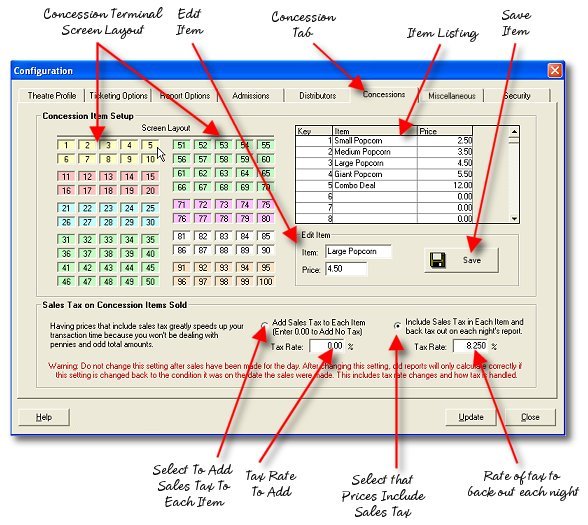
The Concessions setup page is where you configure the various concession items for the system and assign them keys in the selling terminal. It is also where you must tell the system how to handle the collection of sales tax.
Frequently Asked Questions:
Why are some keys different colors than others?
These are arranged so that you can group similar items together, for instance Popcorn items, drink items, candy items, etc.
Do I have to use keys in any specific order? Can I skip keys?
The keys may be used in any order you like and keys may remain blank. These are locked and cannot be punched during a sale.
How do I go to a specific key to edit it?
You can either click the key on the screen template or select the number or item from the list. That item will then appear in the edit window.
What is the "back out" rate for?
This is your total state and local sales tax rate that at the end of the night is deducted from your total concession sales where your prices have included sales tax. The total tax is reported on the sales tax line of your daily summary report.
When is it safe to change concession prices?
Anytime after the final report has been completed for the day and before a new business date has been started. However, you should plan ahead and change the prices at the end of an inventory period as well so that you don't have the double duty of computing an inventory period's sales at two different price rates.